mirror of
https://gitee.com/mirrors_PX4/PX4-Autopilot.git
synced 2026-04-14 10:07:39 +08:00

87 lines
5.8 KiB
Markdown
87 lines
5.8 KiB
Markdown
# Offboard Control
|
|
|
|
::: warning
|
|
[Offboard control](../flight_modes/offboard.md) is dangerous.
|
|
It is the responsibility of the developer to ensure adequate preparation, testing and safety precautions are taken before offboard flights.
|
|
:::
|
|
|
|
The idea behind off-board control is to be able to control the PX4 flight stack using software running outside of the autopilot.
|
|
This is done through the MAVLink protocol, specifically the [SET_POSITION_TARGET_LOCAL_NED](https://mavlink.io/en/messages/common.html#SET_POSITION_TARGET_LOCAL_NED) and the [SET_ATTITUDE_TARGET](https://mavlink.io/en/messages/common.html#SET_ATTITUDE_TARGET) messages.
|
|
|
|
## Offboard Control Firmware Setup
|
|
|
|
There are two things you want to setup on the firmware side before starting offboard development.
|
|
|
|
### Enable RC Override
|
|
|
|
In _QGroundControl_ you can set the [COM_RC_OVERRIDE](../advanced_config/parameter_reference.md#COM_RC_OVERRIDE) parameter to automatically switch from offboard mode (or any mode) to Position mode if the RC sticks are moved.
|
|
This is the best way to ensure that an operator can easily take control of the vehicle and switch to the safest flight mode.
|
|
|
|
### Map an RC switch to offboard mode activation
|
|
|
|
In _QGroundControl_ you can set the [RC_MAP_OFFB_SW](../advanced_config/parameter_reference.md#RC_MAP_OFFB_SW) parameter to the RC channel that will be used to activate offboard mode.
|
|
This can be used to switch between offboard mode and the mode set by the mode switch ([RC_MAP_MODE_SW](../advanced_config/parameter_reference.md#RC_MAP_MODE_SW)).
|
|
You can also switch into offboard mode using a GCS/MAVLink so this is not "mandatory".
|
|
|
|
Note also that this mechanism is not as "safe" as using [RC Override](#enable-rc-override) to switch out of offboard mode, because the mode you switch to is unpredictable.
|
|
|
|
### Enable the companion computer interface
|
|
|
|
Enable MAVLink on the serial port that you connect to the companion computer (see [Companion Computers](../companion_computer/index.md)).
|
|
|
|
## Hardware setup
|
|
|
|
Usually, there are three ways of setting up offboard communication.
|
|
|
|
### Serial radios
|
|
|
|
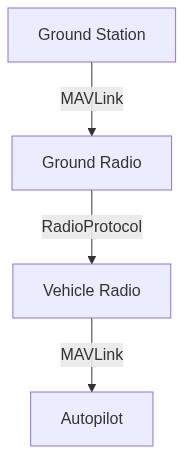
1. One connected to a UART port of the autopilot
|
|
2. One connected to a ground station computer
|
|
|
|
Example radios include:
|
|
- [Digi International XBee Pro](https://www.digi.com/products/embedded-systems/digi-xbee/rf-modules/sub-1-ghz-rf-modules)
|
|
|
|
[](https://mermaid-js.github.io/mermaid-live-editor/#/edit/eyJjb2RlIjoiZ3JhcGggVEQ7XG4gIGduZFtHcm91bmQgU3RhdGlvbl0gLS1NQVZMaW5rLS0-IHJhZDFbR3JvdW5kIFJhZGlvXTtcbiAgcmFkMSAtLVJhZGlvUHJvdG9jb2wtLT4gcmFkMltWZWhpY2xlIFJhZGlvXTtcbiAgcmFkMiAtLU1BVkxpbmstLT4gYVtBdXRvcGlsb3RdOyIsIm1lcm1haWQiOnsidGhlbWUiOiJkZWZhdWx0In0sInVwZGF0ZUVkaXRvciI6ZmFsc2V9)
|
|
|
|
<!-- original mermaid graph
|
|
graph TD;
|
|
gnd[Ground Station] --MAVLink-- > rad1[Ground Radio];
|
|
rad1 --RadioProtocol-- > rad2[Vehicle Radio];
|
|
rad2 --MAVLink-- > a[Autopilot];
|
|
-->
|
|
|
|
### On-board processor
|
|
|
|
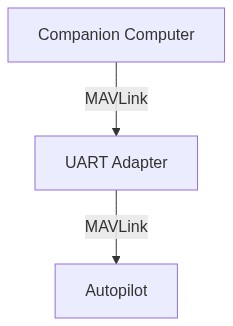
A small computer mounted onto the vehicle, connected to the autopilot through a serial port or Ethernet port.
|
|
There are many possibilities here and it will depend on what kind of additional on-board processing you want to do in addition to sending commands to the autopilot.
|
|
Some examples are provided in [Companion Computers](../companion_computer/index.md#companion-computer-options).
|
|
|
|
[](https://mermaid-js.github.io/mermaid-live-editor/#/edit/eyJjb2RlIjoiZ3JhcGggVEQ7XG4gIGNvbXBbQ29tcGFuaW9uIENvbXB1dGVyXSAtLU1BVkxpbmstLT4gdWFydFtVQVJUIEFkYXB0ZXJdO1xuICB1YXJ0IC0tTUFWTGluay0tPiBBdXRvcGlsb3Q7IiwibWVybWFpZCI6eyJ0aGVtZSI6ImRlZmF1bHQifSwidXBkYXRlRWRpdG9yIjpmYWxzZX0)
|
|
|
|
<!-- original mermaid graph
|
|
graph TD;
|
|
comp[Companion Computer] --MAVLink-- > uart[UART Adapter];
|
|
uart --MAVLink-- > Autopilot;
|
|
-->
|
|
|
|
### On-board processor and wifi link to ROS (**_Recommended_**)
|
|
|
|
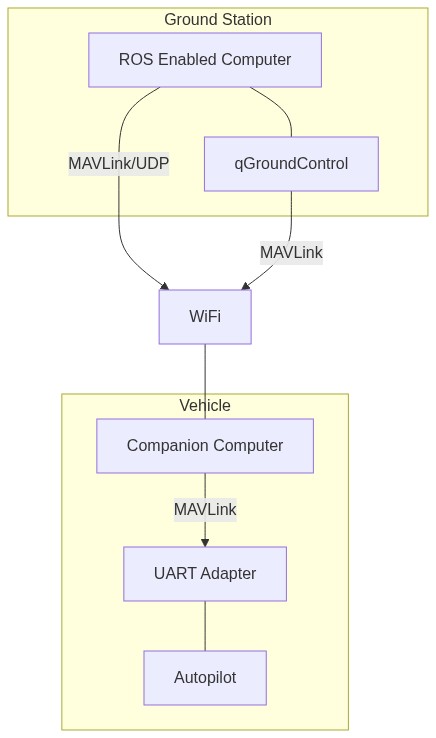
A small computer mounted onto the vehicle connected to the autopilot through a UART to USB adapter while also having a WiFi link to a ground station running ROS.
|
|
This can be any of the computers from the above section coupled with a WiFi adapter.
|
|
|
|
[](https://mermaid-js.github.io/mermaid-live-editor/#/edit/eyJjb2RlIjoiZ3JhcGggVERcbiAgc3ViZ3JhcGggR3JvdW5kICBTdGF0aW9uXG4gIGduZFtST1MgRW5hYmxlZCBDb21wdXRlcl0gLS0tIHFnY1txR3JvdW5kQ29udHJvbF1cbiAgZW5kXG4gIGduZCAtLU1BVkxpbmsvVURQLS0-IHdbV2lGaV07XG4gIHFnYyAtLU1BVkxpbmstLT4gdztcbiAgc3ViZ3JhcGggVmVoaWNsZVxuICBjb21wW0NvbXBhbmlvbiBDb21wdXRlcl0gLS1NQVZMaW5rLS0-IHVhcnRbVUFSVCBBZGFwdGVyXVxuICB1YXJ0IC0tLSBBdXRvcGlsb3RcbiAgZW5kXG4gIHcgLS0tIGNvbXAiLCJtZXJtYWlkIjp7InRoZW1lIjoiZGVmYXVsdCJ9LCJ1cGRhdGVFZGl0b3IiOmZhbHNlfQ)
|
|
|
|
<!-- original mermaid graph
|
|
graph TD
|
|
subgraph Ground Station
|
|
gnd[ROS Enabled Computer] --- qgc[qGroundControl]
|
|
end
|
|
gnd --MAVLink/UDP-- > w[WiFi];
|
|
qgc --MAVLink-- > w;
|
|
subgraph Vehicle
|
|
comp[Companion Computer] --MAVLink-- > uart[UART Adapter]
|
|
uart --- Autopilot
|
|
end
|
|
w --- comp
|
|
-->
|