88d623bedb
* Add vitepress tree

* Update existing workflows so they dont trigger on changes in the docs path

* Add nojekyll, package.json, LICENCE etc

* Add crowdin docs upload/download scripts

* Add docs flaw checker workflows

* Used docs prefix for docs workflows

* Crowdin obvious fixes

* ci: docs move to self hosted runner

runs on a beefy server for faster builds

Signed-off-by: Ramon Roche <mrpollo@gmail.com>

* ci: don't run build action for docs or ci changes

Signed-off-by: Ramon Roche <mrpollo@gmail.com>

* ci: update runners

Signed-off-by: Ramon Roche <mrpollo@gmail.com>

* Add docs/en

* Add docs assets and scripts

* Fix up editlinks to point to PX4 sources

* Download just the translations that are supported

* Add translation sources for zh, uk, ko

* Update latest tranlsation and uorb graphs

* update vitepress to latest

---------

Signed-off-by: Ramon Roche <mrpollo@gmail.com>
Co-authored-by: Ramon Roche <mrpollo@gmail.com>
5.8 KiB
Offboard Control
::: warning Offboard control is dangerous. It is the responsibility of the developer to ensure adequate preparation, testing and safety precautions are taken before offboard flights. :::
The idea behind off-board control is to be able to control the PX4 flight stack using software running outside of the autopilot. This is done through the MAVLink protocol, specifically the SET_POSITION_TARGET_LOCAL_NED and the SET_ATTITUDE_TARGET messages.
Offboard Control Firmware Setup
There are two things you want to setup on the firmware side before starting offboard development.
Enable RC Override
In QGroundControl you can set the COM_RC_OVERRIDE parameter to automatically switch from offboard mode (or any mode) to Position mode if the RC sticks are moved. This is the best way to ensure that an operator can easily take control of the vehicle and switch to the safest flight mode.
Map an RC switch to offboard mode activation
In QGroundControl you can set the RC_MAP_OFFB_SW parameter to the RC channel that will be used to activate offboard mode. This can be used to switch between offboard mode and the mode set by the mode switch (RC_MAP_MODE_SW). You can also switch into offboard mode using a GCS/MAVLink so this is not "mandatory".
Note also that this mechanism is not as "safe" as using RC Override to switch out of offboard mode, because the mode you switch to is unpredictable.
Enable the companion computer interface
Enable MAVLink on the serial port that you connect to the companion computer (see Companion Computers).
Hardware setup
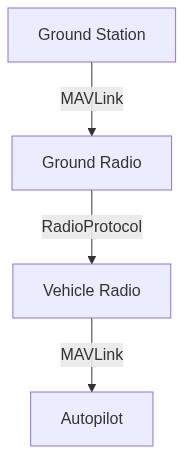
Usually, there are three ways of setting up offboard communication.
Serial radios
-
One connected to a UART port of the autopilot
-
One connected to a ground station computer
Example radios include:
On-board processor
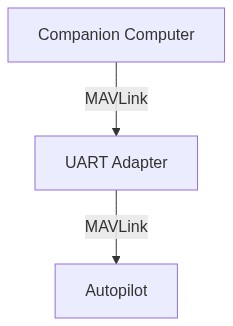
A small computer mounted onto the vehicle, connected to the autopilot through a serial port or Ehthernet port. There are many possibilities here and it will depend on what kind of additional on-board processing you want to do in addition to sending commands to the autopilot. Some examples are provided in Companion Computers.
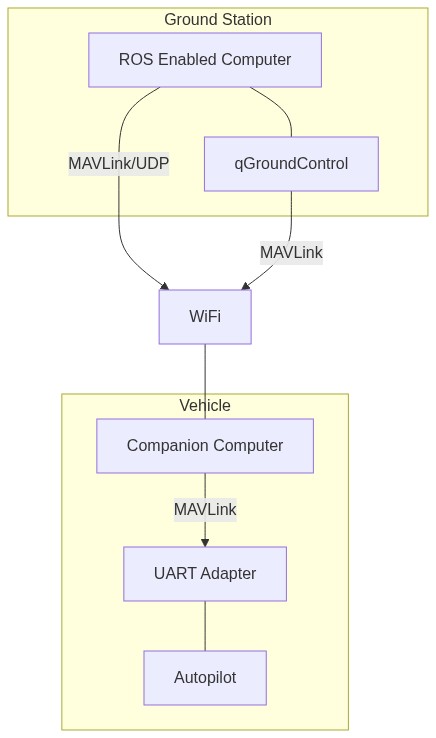
On-board processor and wifi link to ROS (Recommended)
A small computer mounted onto the vehicle connected to the autopilot through a UART to USB adapter while also having a WiFi link to a ground station running ROS. This can be any of the computers from the above section coupled with a WiFi adapter.