# Radio Control Systems
A Radio Control (RC) system can be used to _manually_ control your vehicle from a handheld RC controller.
This topic provides an overview of how RC works, how to choose an appropriate radio system for your vehicle, and how to connect it to your flight controller.
:::tip
PX4 can also be manually controlled using a [Joystick](../config/joystick.md) or gamepad-like controller: this is different to an RC system!
The [COM_RC_IN_MODE](../advanced_config/parameter_reference.md#COM_RC_IN_MODE) parameter [can be set](../advanced_config/parameters.md) to choose whether RC (default), Joystick, both, or neither, are enabled.
:::
::: info
PX4 does not require a remote control system for autonomous flight modes.
:::
## How do RC Systems Work?
An _RC system_ has a ground-based _remote control unit_ that is used by the operator to command the vehicle.
The remote has physical controls that can be used to specify vehicle movement (e.g. speed, direction, throttle, yaw, pitch, roll, etc.) and to enable autopilot [flight modes](../flight_modes/index.md) (e.g. takeoff, land, return to land, mission etc.).
On _telemetry-enabled_ RC systems, the remote control unit can also receive and display information from the vehicle, such as battery level, flight mode, and warnings.

The ground based RC controller contains a radio module that is bound to, and communicates with, a (compatible) radio module on the vehicle.
The vehicle-based unit is connected to the flight controller.
The flight controller determines how to interpret the commands based on the current autopilot flight mode and vehicle state, and drives the vehicle motors and actuators appropriately.
::: info
The ground- and vehicle- based radio modules are referred to as the transmitter and receiver respectively (even if they support bidirectional communication) and are collectively referred to as a _transmitter/receiver pair_.
The RC controller and it's included radio module are commonly referred to as a "transmitter".
:::
An important quality of an RC system is how many "channels" it supports.
The number of channels defines how many different physical controls on the remote control can be used to send commands to the vehicle (e.g. how many switches, dials, control sticks can actually be used).
An aircraft must use a system that supports at least 4 channels (for roll, pitch, yaw, thrust).
Ground vehicles need at least two channels (steering + throttle). An 8 or 16 channel transmitter provides additional channels that can be used to control other mechanisms or activate different [flight modes](../flight_modes/index.md) provided by the autopilot.
## Types of Remote Controllers
### Remote Control Units for Aircraft
The most popular _form_ of remote control unit for UAVs is shown below.
It has separate control sticks for controlling roll/pitch and for throttle/yaw as shown (i.e. aircraft need at least 4 channels).
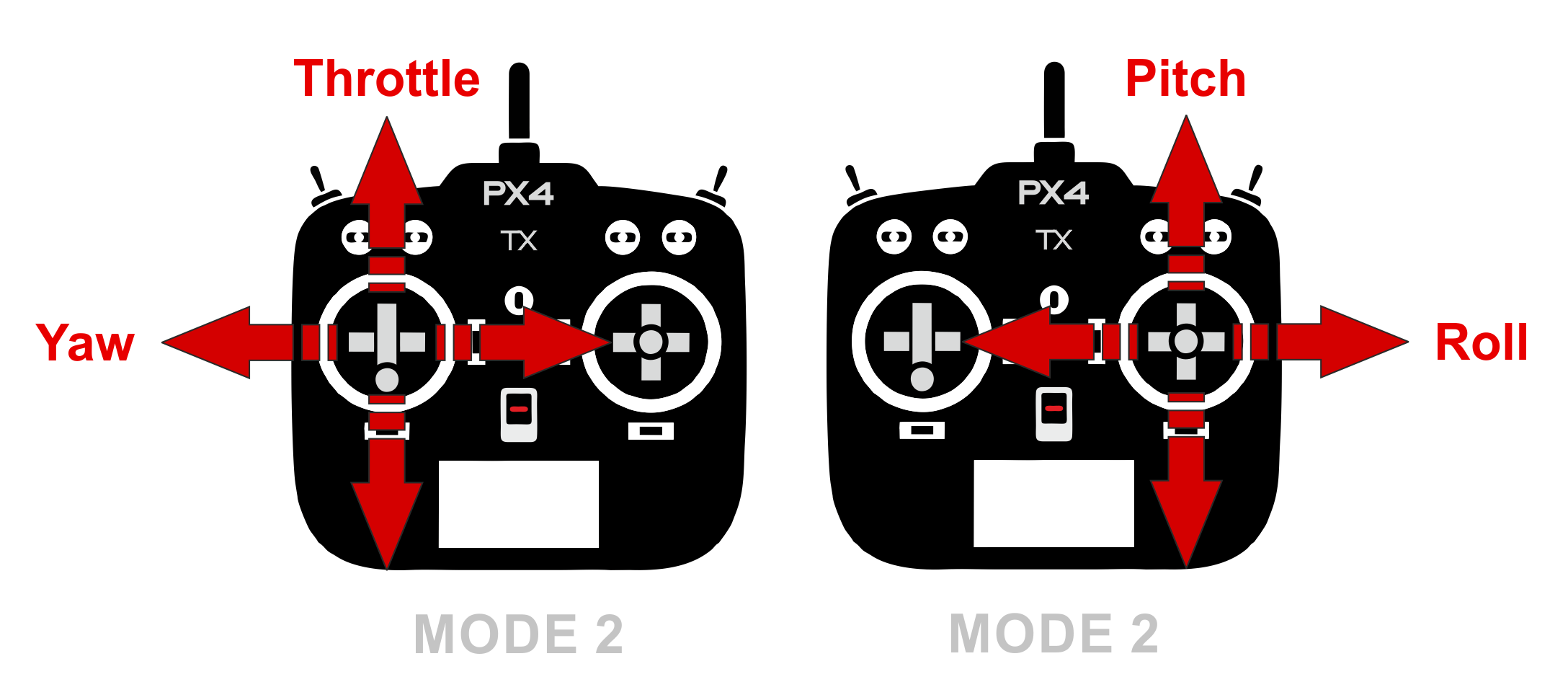
There are numerous possible layouts for the control sticks, switches, etc.
The more common layouts have been given specific "Mode" numbers. _Mode 1_ and _Mode 2_ (shown below) differ only in the placement of the throttle.

::: info
The choice of mode is largely one of taste (_Mode 2_ is more popular).
:::
## Remote Control Units for Ground Vehicles
An Unmanned Ground Vehicle (UGV)/car minimally requires a 2 channel transmitter in order to send the values for steering and speed.
Commonly transmitters set these values using a wheel and trigger, two single-axis control sticks, or a single dual-axis control stick.
There is nothing to stop you using more channels/control mechanisms, and these can be very useful for engaging additional actuators and autopilot modes.
## Choosing RC System Components
You will need to select a transmitter/receiver pair that are compatible with each other.
In addition, receivers have to be [compatible with PX4](#compatible_receivers) and the flight controller hardware.
Compatible radio systems are often sold together.
For example, [FrSky Taranis X9D and FrSky X8R](https://hobbyking.com/en_us/frsky-2-4ghz-accst-taranis-x9d-plus-and-x8r-combo-digital-telemetry-radio-system-mode-2.html?___store=en_us) are a popular combination.
### Transmitter/Receiver Pairs
One of the most popular RC units is the _FrSky Taranis X9D_.
It has an internal transmitter module can be used with the recommended _FrSky X4R-SB_ (S-BUS, low delay) or _X4R_ (PPM-Sum, legacy) receivers out of the box.
It also has a custom radio transmitter module slot and customizable open source OpenTX Firmware.
::: info
This remote control unit can display vehicle telemetry when used with [FrSky](../peripherals/frsky_telemetry.md) or [TBS Crossfire](../telemetry/crsf_telemetry.md) radio modules.
:::
Other popular transmitter/receiver pairs
- Turnigy remote using, for example, the FrSky transmitter/receiver modules.
- Futaba Transmitters and compatible Futaba S-Bus receivers.
- Long range ~900MHz, low latency: "Team Black Sheep Crossfire" or "Crossfire Micro" set with a compatible remote (e.g. Taranis)
- Long Range ~433MHz: ImmersionRC EzUHF set with a compatible remote (e.g. Taranis)
### PX4-Compatible Receivers {#compatible_receivers}
In addition to the transmitter/receiver pairs being compatible, the receiver must also be compatible with PX4 and the flight controller hardware.
_PX4_ and _Pixhawk_ have been validated with:
- PPM sum receivers
- S.BUS and S.BUS2 receivers from:
- Futaba
- FrSky S.BUS and PPM models
- TBS Crossfire with SBUS as output protocol
- Herelink
- TBS Crossfire with ([CRSF protocol](../telemetry/crsf_telemetry.md))
- Express LRS with ([CRSF protocol](../telemetry/crsf_telemetry.md))
- TBS Ghost with (GHST protocol)
- Spektrum DSM
- Graupner HoTT
Receivers from other vendors that use a supported protocol are likely to work but have not been tested.
::: info
Historically there were differences and incompatibilities between receiver models, largely due to a lack of detailed specification of protocols.
The receivers we have tested all now appear to be compatible, but it is possible that others may not be.
:::
## Connecting Receivers
As general guidance, receivers connect to the flight controller using the port appropriate to their supported protocol:
- Spektrum/DSM receivers connect to the "DSM" input.
Pixhawk flight controllers variously label this as: `SPKT/DSM`, `DSM`, `DSM/SBUS RC`, `DSM RC`, `DSM/SBUS/RSSI`.
- Graupner HoTT receivers: SUMD output must connect to a **SPKT/DSM** input (as above).
- PPM-Sum and S.BUS receivers must connect directly to the **RC** ground, power and signal pins.
This is typically labeled: `RC IN`, `RCIN` or `RC`, but has in some FCs has been labeled `PPM RC` or `PPM`.
- PPM receivers that have an individual wire for each channel must connect to the RCIN channel _via_ a PPM encoder [like this one](https://www.getfpv.com/radios/radio-accessories/holybro-ppm-encoder-module.html) (PPM-Sum receivers use a single signal wire for all channels).
- TBS Crossfire/Express LRS Receivers using [CRSF Telemetry](../telemetry/crsf_telemetry.md) connect via a spare UART.
Flight controllers usually include appropriate cables for connecting common receiver types.
Instructions for connecting to specific flight controllers are given in their [quick-start](../assembly/index.md) guides (such as [CUAV Pixhawk V6X Wiring Quick Start: Radio Control](../assembly/quick_start_cuav_pixhawk_v6x.md#radio-control) or [Holybro Pixhawk 6X Wiring Quick Start: Radio Control](../assembly/quick_start_pixhawk6x.md#radio-control)).
:::tip
See the manufacturer's flight controller setup guide for additional information.
:::
## Binding Transmitter/Receiver
Before you can calibrate/use a radio system you must _bind_ the receiver and transmitter so that they communicate only with each other.
The process for binding a transmitter and receiver pair is hardware specific (see your manual for instructions).
If you are using a _Spektrum_ receiver, you can put it into bind mode using _QGroundControl_: [Radio Setup > Spectrum Bind](../config/radio.md#spectrum-bind).
## Set Signal-Loss Behaviour
RC receivers have different ways of indicating signal loss:
- Output nothing (automatically detected by PX4)
- Output a low throttle value (you can [configure PX4 to detect this](../config/radio.md#rc-loss-detection)).
- Output the last received signal (PX4 cannot handle this case!)
Choose a receiver that can emit nothing (preferred) when RC is lost, or a low throttle value.
This behaviour may require hardware configuration of the receiver (check the manual).
For more information see [Radio Control Setup > RC Loss Detection](../config/radio.md#rc-loss-detection).
## Related Topics
- [Radio Control Setup](../config/radio.md) - Configuring your radio with PX4.
- Manual Flying on [multicopter](../flying/basic_flying_mc.md) or [fixed wing](../flying/basic_flying_fw.md) - Learn how to fly with a remote control.
- [TBS Crossfire (CRSF) Telemetry](../telemetry/crsf_telemetry.md)
- [FrSky Telemetry](../peripherals/frsky_telemetry.md)